Natural-language analytics · Workflow
From Natural-Language Question to Inspectable Analytical Workflow
Natural language is a very good input format. The evidence should finish as data, queries, calculations and reusable analytical artefacts.
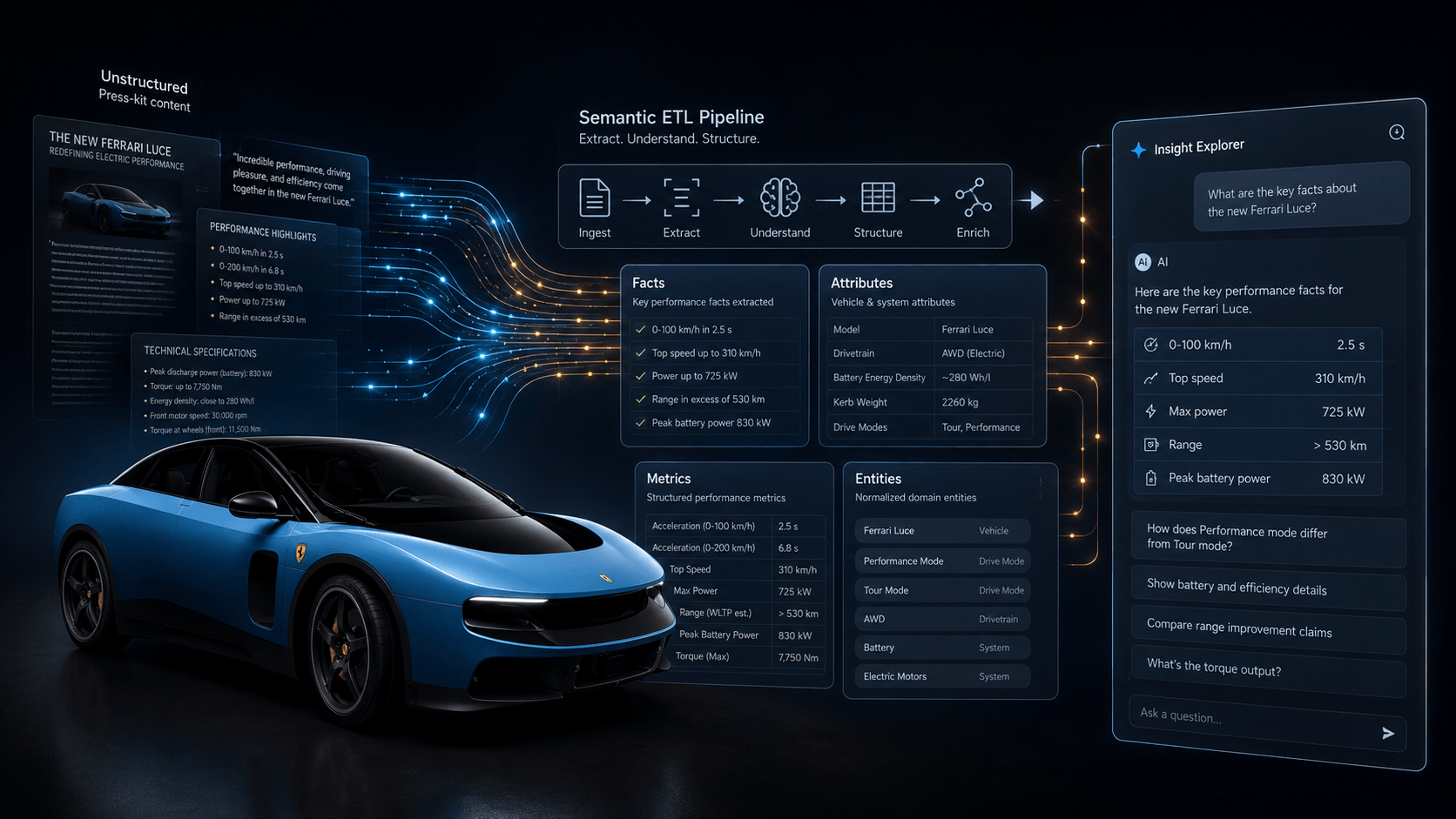
Everyone was talking about the Ferrari Luce for different reasons. I used its press kit for a different experiment: turning roughly 90,000 characters of PDF and text into structured, queryable data.
The workflow, all in Omniscope, looked like this:
PDF and text
  → LangExtract in a custom block
  → facts, attributes, metrics, entities and run metadata
  → Insight Explorer Q&A over the structured tables
The Q&A model was not repeatedly retrieving from the raw document. We extracted the material once, kept grounded source spans, reviewed the resulting tables and then asked questions over those records.
That is a much more interesting use of natural language than putting a chat box over a document and hoping for the best. The initial request can be informal, but the work it creates should become something people can inspect.
Step 1: state the analytical intent
The task in this experiment was to turn the Ferrari press kit into structured facts that could be queried many times. That immediately raises questions the workflow has to settle. Which kinds of thing count as a fact? How should a performance number differ from an attribute? Which entity does a statement belong to? What happens when the document does not provide a value?
We instructed the extraction not to invent missing information and to preserve the source text supporting each record. These are part of the analytical intent, not optional prompt decoration.
For a normal question over tables, the same discipline applies. The model may need the organisation’s definition of a metric, the comparison period or an exclusion before it can plan sensible work. Sometimes the context resolves the term. Sometimes the quickest route is to ask the user.
Step 2: supply the right context
The model cannot build a reliable plan from a filename or a list of table names alone. In the Ferrari workflow, it needed the document, the extraction schema, the required record types and the rule that each extracted item stay grounded in the source.
Once those records existed, Insight Explorer needed the related tables, their fields and relationships, types and units, plus any quality warnings from the extraction run. The application also decides which data the selected model may see. A cloud model might receive schema and aggregates while a local model is allowed to inspect sample rows.
More context is not always better. I want the context needed for the task, without dumping every available document or an uncontrolled warehouse into the model window.
Step 3: create a plan that can become operations
For this experiment the plan was concrete:
- load and prepare the press-kit text;
- extract facts, attributes, metrics and entities with grounded source spans;
- turn those results into related analytical tables;
- keep run metadata so the extraction can be identified;
- review the structured output and its quality;
- let Insight Explorer query those tables;
- preserve useful queries, charts and evidence in Omniscope.
LangExtract and the local model helped perform the fuzzy part: recognising meaning in unstructured language. Omniscope handled the surrounding data workflow and the resulting analytical records. The plan did not remain a paragraph describing what the system would do.
Step 4: execute against governed data
Once the extraction ran, the press kit became ordinary analytical data: filterable, joinable, visualisable and available to the same data-quality and reporting tools as other Omniscope datasets.
That gave us tables for performance metrics, battery specifications, design features, collaborators, entities and attributes. Run metadata identified the extraction, while grounded spans retained the connection to the original document.
unstructured document
  → grounded extraction
  → typed relational records
  → quality review
  → repeated analytical questions
This execution record is more useful than a model saying it “read the press kit”. I can inspect the extracted row, its type and the source text from which it came.
Step 5: validate before narrating
Extraction can look impressive while quietly dropping a qualification, duplicating a fact or assigning a number to the wrong entity. Before asking for a polished summary, start with ordinary checks: inspect the source span, look for duplicates and missing values, confirm types and units, review the related entity, and make sure absent information has not been filled by the model’s imagination.
The table design matters too. Facts, attributes, metrics and entities have different shapes. Forcing all of them into one vague text table would make the next analytical step harder, even if the extraction itself sounded clever.
Validation does not need to become a giant ceremony. A small review of the records most relevant to the question can catch a bad extraction before it becomes a confident answer.
Step 6: produce an answer that points back to evidence
Insight Explorer then answered natural-language questions over the structured semantic layer. If an answer used a performance metric, the reviewer could inspect the table record and the grounded press-kit span behind it. The model’s internal reasoning was not the evidence; the extracted records and executed query were.
This is the purpose of the “Explain Query” work in Omniscope Insight Explorer. Lineage, chart configuration, data, formulae, input origins and limitations remain connected to the response.
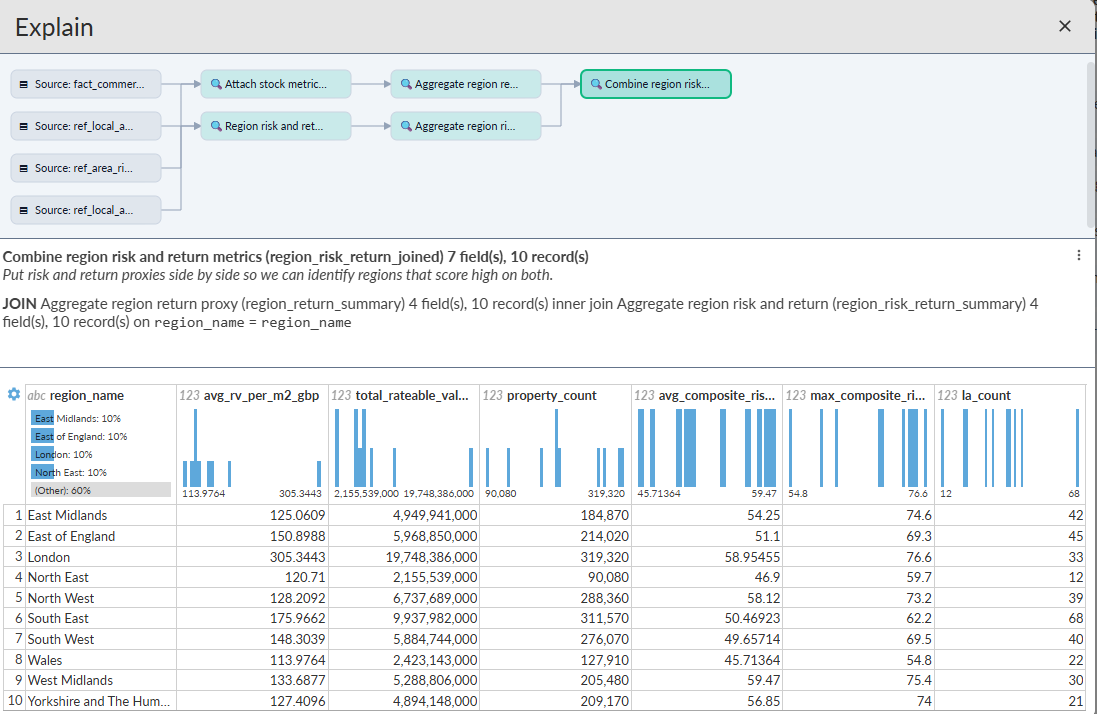
The narrative should still distinguish what came directly from the source, what was derived, which parameters the user supplied and which limitations remain.
Step 7: turn the answer into an artefact
A useful query should have a life beyond the chat. In Omniscope I can save it, edit the generated operations, add its chart to a report, compare the method, rerun it when data changes and place validation or scheduling around it.
Most questions do not need to become dashboards. But when a question is asked again, or its answer starts feeding a decision, rebuilding the method from prompt history is a waste. The structured tables and saved query give the work somewhere normal to live.
The result: extract once, query many times
Repeatedly sending all 90,000 characters to a chat would be slower, more expensive and harder to review. The semantic-ETL approach performs the fuzzy extraction once and makes the result available for many analytical questions.
It also changes where an error can be corrected. If a source passage was extracted badly, fix or rerun the extraction. If the query used the wrong field, inspect and revise the query. You do not have to keep rephrasing the question and hoping the next answer improves.
The full semantic-ETL experiment includes the workflow and table design in more detail. The LLM was one useful step inside it, not the whole application.
What can still go wrong?
An inspectable workflow is not immune to error. The extraction may omit a qualification, the source document itself may be misleading, a technically valid relationship may still be wrong for the question, or a reviewer may approve the result too quickly.
The advantage is having somewhere to look. We can inspect the resolved definition, source passage, extracted record, intermediate tables, executed operations and final claim. A disagreement can become a correction to a specific step rather than another round of prompting.
A practical standard
For a natural-language analytical system, I would still ask five questions:
- Intent: What did it decide the user meant?
- Method: Which operations did it choose?
- Execution: What actually ran against the data?
- Evidence: Which records and calculations support the claims?
- Reuse: What can be saved, edited and rerun?
If the answer to any of these is “somewhere in the conversation”, the work is not ready to reuse.
Language at the front, structure underneath
Natural language made the Ferrari experiment easier to define and made the resulting tables easier to question. The durable part was still the workflow: grounded extraction, related records, quality review, executed queries and artefacts that could be opened again.
If an answer looked wrong, I knew whether to inspect the source span, the extraction or the query. That is a much better debugging interface than asking the same document another question and getting a new paragraph back.