Internal tools · Data applications
How to Turn an Analytical Workflow into an Internal Product
What a customer-success prototype taught me about systems of record, focused interfaces and the work that remains after AI builds the first version.
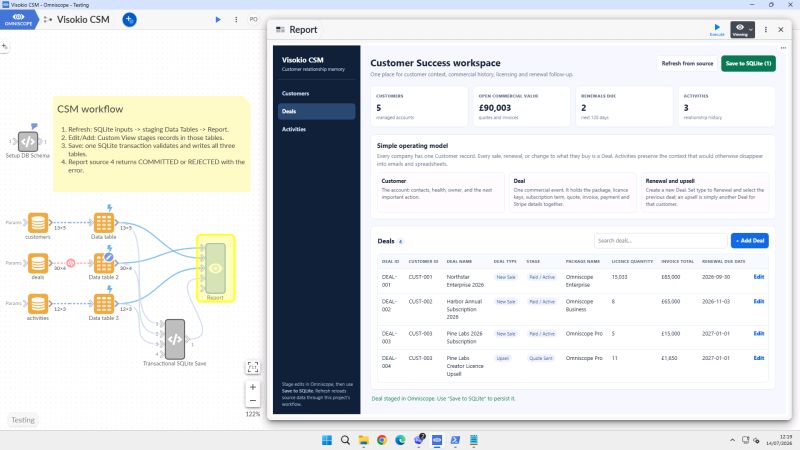
Do not use AI only to write code. Ask it to help author a system you can inspect, understand and verify.
I tested that idea in July 2026 with OpenAI Sol and Terra 5.6 in the Codex app. The agent could author through our MCP server and, when necessary, continue through the Omniscope browser interface. I asked it to build a small internal customer-success application covering customers, deals, renewals and activities.
The interesting result was not a quickly generated dashboard. It was a working prototype in which the operational flow remained visible: I could inspect the workflow, transformations, formulae, forms, report configuration and database interactions. The experiment also forced some real product decisions. We had to decide where durable state lived, which changes required transactional writes, what belonged in Omniscope, where custom code helped and what still separated the prototype from production.
Start with a job, not a chart
Before choosing a layout, I need to know who opens the product, what has happened to make them open it, which decision or action they need to complete, what information is needed at that moment and what should happen afterwards.
For a customer-success manager, the job might be:
Review accounts with a renewal due in the next 90 days, understand risk and recent activity, update the follow-up state and assign the next action.
That statement immediately requires more than charts. The manager needs a list of accounts, renewal and deal state, activity history, risk logic, filters and prioritisation. If they can update a follow-up or assign the next action, the product also needs user identity, a durable write and an audit of what changed. The report supplies the context; the application has to carry the action.
Model entities, state and actions
An analytical dataset is often designed to answer questions. An application model must also support change. In this case the durable entities included customers, contracts, opportunities, renewals, users, activities and tasks. We then had to identify the state each one owned and the actions allowed to change it.
For example:
| Entity | Example state | Example action |
|---|---|---|
| Customer | segment, owner, risk band | reassign owner |
| Renewal | due date, value, stage | change stage |
| Activity | type, time, note | add activity |
| Task | assignee, status, due date | complete or defer |
Writing this down prevents a chart filter, an editable table and an API from quietly inventing different versions of the business process.
Choose the system of record early
Early in the customer-success prototype, we decided that the analytics project should not quietly become the transactional database. I worked with the AI to design a structured SQLite schema and transactional writes for the durable state. Omniscope handled the visible application, preparation, validation, editing and reporting. Python blocks and JavaScript views extended the parts that needed custom behaviour.
That division made responsibilities clearer:
SQLite
  → owns transactional records and integrity

Omniscope
  → prepares, validates, analyses and presents

Focused application controls
  → let authorised users perform defined actions
SQLite was appropriate for this internal prototype. A production application with many concurrent users might require another database and a more substantial service layer, but making one system authoritative before users began changing state gave the prototype a clean boundary.
Keep the workflow visible
The analytical logic remained visible as the interface took shape. A builder or reviewer could inspect the source ingestion, joins, transformations and quality checks; see how risk or priority fields were derived; follow the parameters into the workflow; and inspect both a write and the state returned to each report view.
That made iteration practical. If a user said an account was in the wrong risk band, we could open the rule and its input fields instead of searching an opaque application backend. We still wrote tests, but the workflow gave those tests and the review a clear object.
Design a focused interaction surface
The user should see the controls required for the job. That may mean selecting an account, changing an allowed field, adding a note, running an approved calculation, comparing scenarios, approving or rejecting a result, exporting it or triggering a workflow. The connections, intermediate blocks and builder settings can remain behind that focused surface.
Omniscope reports can pass parameters into workflows and trigger execution. This pattern has existed in the platform for years: a report acts as both a control panel and a result surface.
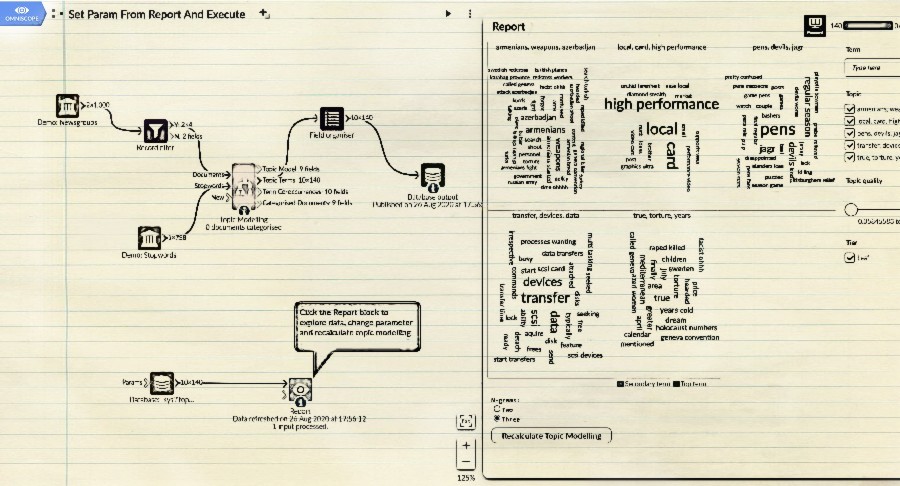
The same idea supports a sales-capacity simulation. A user changes opportunity volume, win rate, stage duration or rep capacity, runs the model and immediately sees the resulting headcount and revenue path. In that application, the report is both the control panel and the place where the result is investigated.
Treat editing as a privileged action
An editable table is deceptively powerful. Before enabling it, we need to decide which fields are editable, which values are valid and whether a change requires approval. We also need behaviour for concurrent edits, useful validation errors, retention of the previous value and an audit of who made the change.
The write path must say whether a failed operation can be retried safely and which downstream calculations refresh after it succeeds. A change to customer ownership or renewal stage should look and behave like a durable application action, not like an innocent report filter.
This is another reason to separate transient analytical state from the system of record. Filters and scenario parameters may exist only for the session. Customer ownership and renewal stage probably should not.
Add permissions at the action level
Viewing a result and changing its source require different permissions. An internal product may have readers who explore, operators who run workflows, editors allowed to change particular state, approvers who publish or confirm, and administrators who alter the application. Giving all of them one broad builder permission would erase the boundary we had just designed.
If the application calls an API, the service identity should have only the permissions that action requires. If it displays a published report, the report’s data layer should contain only the fields appropriate to that audience.
Make state and failure visible
When a user clicks Run, the product should show whether the request is queued, executing, completed, completed with warnings, rejected by validation, failed or awaiting approval.
Optimistic interfaces are pleasant until the workflow fails silently and the user assumes a change was saved.
Return actionable errors. Preserve the user’s input where safe. Prevent accidental double submission. Give operators enough detail to diagnose the workflow without exposing secrets to the end user.
Release the product, not only the workflow
An internal product has several surfaces that change together: the data schema, workflow logic, report and interface, custom code, API contract, validation rules, permissions and deployment configuration. They need to be versioned and tested as one release.
A working copy or staging project gives the team somewhere to exercise representative workflows before changing the live application. Automated tests should cover important calculations and write paths. A second human or model review can help, but responsibility remains with the team shipping it.
In this experiment, most of my time went into defining the problem, refining requirements and reviewing. I asked the agent to write tests and used another model to review the code. Producing more code was rarely the difficult part.
Know the prototype boundary
The July 2026 customer-success application was an internal prototype, obviously. Production software still requires engineering around authentication, concurrency, recovery, security, retention, deployment, monitoring and support. The CSV-to-scheduled-application guide covers those production controls in detail.
That caveat does not diminish the experiment. It tells us exactly what the prototype proved and which work remains.
A product test
I would run one final test before calling an analytical workflow an internal product. Can we name the user and the job they complete? Can we identify the entities and state exposed by the application, the authoritative system for each state, the actions the user can take and the consequence of each action? And is there a person who owns the product after launch?
The customer-success prototype gave us concrete answers for the system of record, the visible workflow and the focused application surface. It also made the remaining production work impossible to hide, which is exactly what I wanted from the experiment.