Data products · Operations
From CSV Prototype to Scheduled Data Application
What I would add to a four-hour data-quality prototype before asking teams to depend on it every Monday.

In November 2025 I built a small data-quality application in about four hours. It was me, ChatGPT, Omniscope Report Ninja and a coffee break.
The application was deliberately simple. A user could upload a CSV or Excel file and receive an interactive report showing missing values, duplicate rows and numeric outliers. I built the Omniscope workflow, API wiring, project template and deployment. ChatGPT helped with a bounded Python component and a few parts of the landing page; Report Ninja shaped the report created for each uploaded dataset. I kept the assembly, review and deployment in my hands.
That division of work was important. I could have asked an agent to generate the backend, interface, workflow, reporting and API integration in one go, but the more components I put into one prompt, the more the model started to lose the plot. Building useful pieces and joining them inside a system I could inspect was faster.
Four hours was enough to prove the idea and put a live demonstration in front of people. It did not answer what would happen if 40 teams depended on it every Monday, a source column changed name, two runs arrived together or the result failed without anybody noticing. Those questions begin the journey from a CSV prototype to a scheduled data application.
First, prove the job
The earliest version needed to answer one question:
Does this help a specific person complete a useful task?
For the Data Quality Inspector, the complete job was to accept a tabular file, profile its structure and contents, make quality problems visible, let the user investigate them and then discard the temporary project created for the demonstration. That narrow definition is what made the four-hour build possible.
At this stage I want representative data and the complete path in front of a real user. I want to see which warnings cause somebody to act, which charts help them investigate and which outputs are merely decorative. I do not need to pretend that temporary retention, one user at a time and manual observation are production choices, but I do need to record those shortcuts so they do not quietly become permanent.
Define the data contract
A CSV looks simple largely because it carries so little formal structure. The application still has to know which formats and encodings it accepts, the maximum file and row size, whether headers are required, and which fields are required or optional. It needs expectations for data types, dates and decimal conventions, a rule for extra fields and duplicates, and a way to communicate schema changes.
Those decisions form the contract for each run. The contract should also separate a warning from a failure; a data-quality application exists precisely because the input will be messy, so rejecting every imperfect file would make it fairly useless.
For example, a missing required identifier may stop the run. A field with 18% missing values may continue with a prominent warning.
Build quality gates into the workflow
The prototype probably contains profiling and cleaning logic. Turn the important parts into explicit gates:
upload
  → file validation
  → schema and type checks
  → data profiling
  → transformation
  → business validation
  → analytical output
Each gate should finish in a state the user and operator can understand: passed, passed with warnings, rejected with an actionable explanation, or failed because the system could not complete the check. A run that simply produces no report leaves everybody guessing about which of those things happened.
Keep the rejected rows, warnings and rule results available to the user where appropriate. A hidden quality filter can make the final chart cleaner while making the application less trustworthy.
Parameterise instead of cloning
The first successful prototype often becomes ten copied projects:
customer-a-final.iox
customer-b-final-v2.iox
customer-c-new-final.iox
This feels fast until the core logic changes.
A better design keeps the profiling and reporting logic stable while passing the input source, customer or business-unit identifier, date range, thresholds, output destination, branding and permitted views as parameters. One reusable workflow or project template can then serve many executions, with changes made once and the variation still visible.
Omniscope project workflows can be executed through the Workflow REST API or created from governed templates through the Project API. The same approach applies outside Omniscope. Before copying a project, I would first ask whether the difference can be expressed as a visible parameter.
Give the user a narrow front door
The person using the finished application usually needs a much smaller interface than the person who built it: an upload control or source selector, a few safe parameters, a clear way to start the run, progress and error information, and the resulting report or export. The workflow blocks, connection properties and publishing settings can remain in the builder.
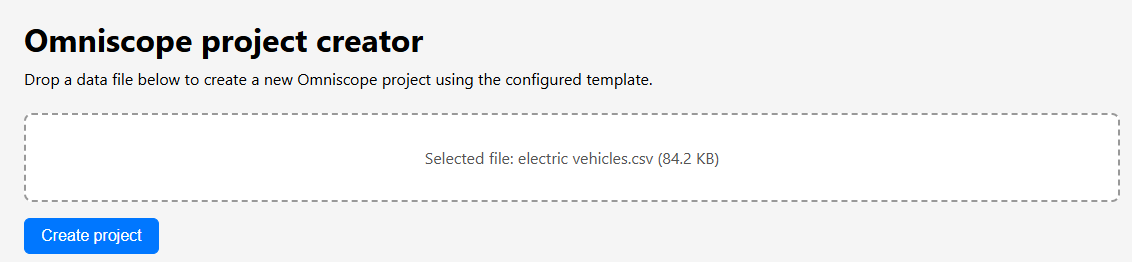
This boundary improves usability and security at the same time. It restricts the user to validated inputs while the workflow retains its broader internal capability.
Make execution asynchronous when it needs to be
A small file may complete while the browser waits. A larger workflow should not depend on one open HTTP connection.
A robust application can accept and validate the request, create a job identifier, start the execution and expose pending, running, completed, warning and failed states while the user does something else. The same job identifier lets the user retrieve the result later and lets the application expire temporary data according to policy. It also gives the interface enough information to distinguish a long-running job from an application error and to stop an impatient user launching the same expensive request repeatedly.
Add automation carefully
Once the manual path works, the same execution may start at a particular time or interval, when a file arrives in a watched location, through an API call from another application, on demand from the report, or after an upstream event.
Omniscope’s Scheduler supports scheduled, on-demand and watch-folder patterns with task status and logs.
Adding the time is straightforward. Operating the run takes more thought. The application needs defined behaviour when the same input arrives twice or the previous run is still active. It must decide whether partial outputs are visible, which failures retry and who is notified. It also needs a freshness limit, a rule for corrected files and a choice between retaining, overwriting or versioning earlier results. The Scheduler can start the workflow, but those decisions still belong to the application owner.
Separate development from production
Once people depend on the application, editing the live copy directly becomes an unnecessary risk.
Use a development or working copy, test with representative data, review the change and promote a known version. Preserve enough history to restore the previous release.
That separation needs to cover the workflow logic, report layout, data-quality rules, custom Python or JavaScript, project templates and external API contracts together. Testing only the workflow while changing the interface or its contract is an incomplete release.
Omniscope Working Copies and project release management provide one implementation of this separation. They give the team somewhere to test a complete change and a known version to restore if the new one behaves differently with production data.
Design retention and access
Uploaded files often contain more sensitive data than the person building the prototype realises.
Before accepting a real file, decide where it is stored, who can retrieve it and whether any part of it appears in logs or backups. Set retention periods for the source, intermediate and result data; decide whether generated projects are isolated by user or organisation; verify deletion; and give the workflow only the credentials it needs.
The public Data Quality Inspector demonstration deliberately limits runs and automatically removes temporary projects. A permanent internal application would need a retention policy tied to its real users and obligations.
Observe the application, not only the server
Server health is only part of this. I would monitor execution duration, success and failure rates, queue depth, publication time and user-facing availability, but also source freshness, unexpected row-count changes, schema drift, rejected-record volume and empty or implausible outputs. A workflow can complete exactly as designed while publishing yesterday’s data as if it were current; the process is alive, but the analytical result is wrong.
Production-readiness checklist
Before calling the prototype an internal service, I would want a clear answer to each of these:
- Who is the user and what decision or task does the application support?
- What input contract does it enforce?
- Which data-quality failures stop or warn?
- Is the core logic parameterised rather than copied?
- Can users operate it without builder-level access?
- Are long-running jobs and errors visible?
- Are repeated and concurrent executions safe?
- Are permissions, secrets and retention documented?
- Can changes be tested, released and rolled back?
- Are source freshness and analytical anomalies monitored?
- Is there a runbook for common failures?
- Who owns it when the person who built the prototype is away?
The last question is usually the revealing one. A demo can depend on the person who built it watching every run; a shared service needs somebody to own what happens when that person is away.
Scheduling is not the finish line
The Data Quality Inspector moved from an idea to a live application in four hours because Omniscope already supplied much of the preparation, automation and reporting machinery, while the AI helped with bounded pieces. I would keep that visible workflow if the application became a permanent service and add the stronger contracts, parameters, permissions and release controls around it.
Before putting the same project on a Monday schedule, I would want the idempotency, access control, schema-drift handling, monitoring and ownership questions answered. The cron expression can wait until we know what the next run is allowed to do.